
Settlement Reporting
Newpay will deposit funds into your account from your financed purchases. You can find detailed information about these deposits in the Dashboard, which provides transparency on the funds credited to your bank account.
Newpay also sends remittance advice for all settlements, ensuring you are notified when a payout is due from a lender. This advice is emailed to your designated finance contact on the settlement due date. Each settlement has a unique reference number to assist with reconciliation and to quote in case of any inquiries.
View Settlements
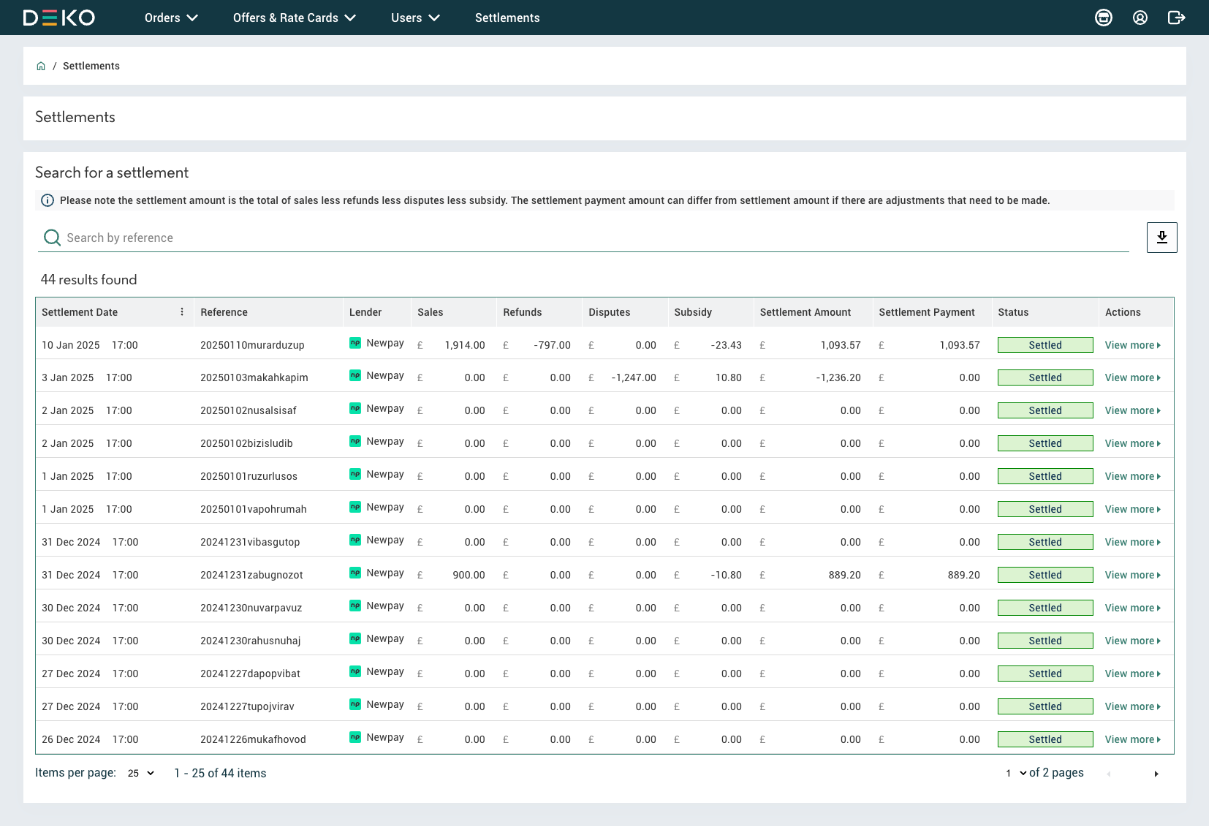
The Settlement view in the Dashboard shows a list of past and upcoming lender payouts, organised by date and unique reference. For each settlement, it summarises the total sales during the settlement period, any deductions due to refunds and disputes, the charge for any finance offers used (known as the merchant subsidy), and the final settlement amount.
Similar to the Orders view, you can search or filter the table to find specific settlements. You also have the option to download a filtered list of settlements as a CSV file to help with bank reconciliation.
ImportantIf there is a gap in transaction processing, such as a day without any finance orders for a given lender, no settlement line item will appear for that day.
Deductions
The settlement amount may be adjusted for any refunds or disputes processed during the relevant period, with these amounts deducted from the total payment as outlined in the remittance advice.
As a result, a settlement can have a positive or occasionally negative total outpayment value. The values will be clearly marked with signs (-) and (+) in the table against the settlement amount. If a settlement shows a (-) figure, no payout will be made to your bank account, and the amount will be deducted from the next (+) settlement.
| Status | Description |
|---|---|
| Settled | The settlement has been processed successfully |
| Pending | The settlement is yet to be processed |
| Data | Description |
|---|---|
| Installation | The specific instance of your website or brand that was used for Newpay |
| Reference | A unique identifier for the settlement |
| Sales | Total value of sales |
| Refunds | Total value of refunds |
| Disputes | Total value of disputes raised by customers |
| Subsidy | Any subsidies applied |
| Settlement Amount | The net amount settled |
| Settlement Payment | The actual payment amount processed |
| Status | Current status of the settlement [e.g. Settled, Pending] |
Detailed Settlement Report
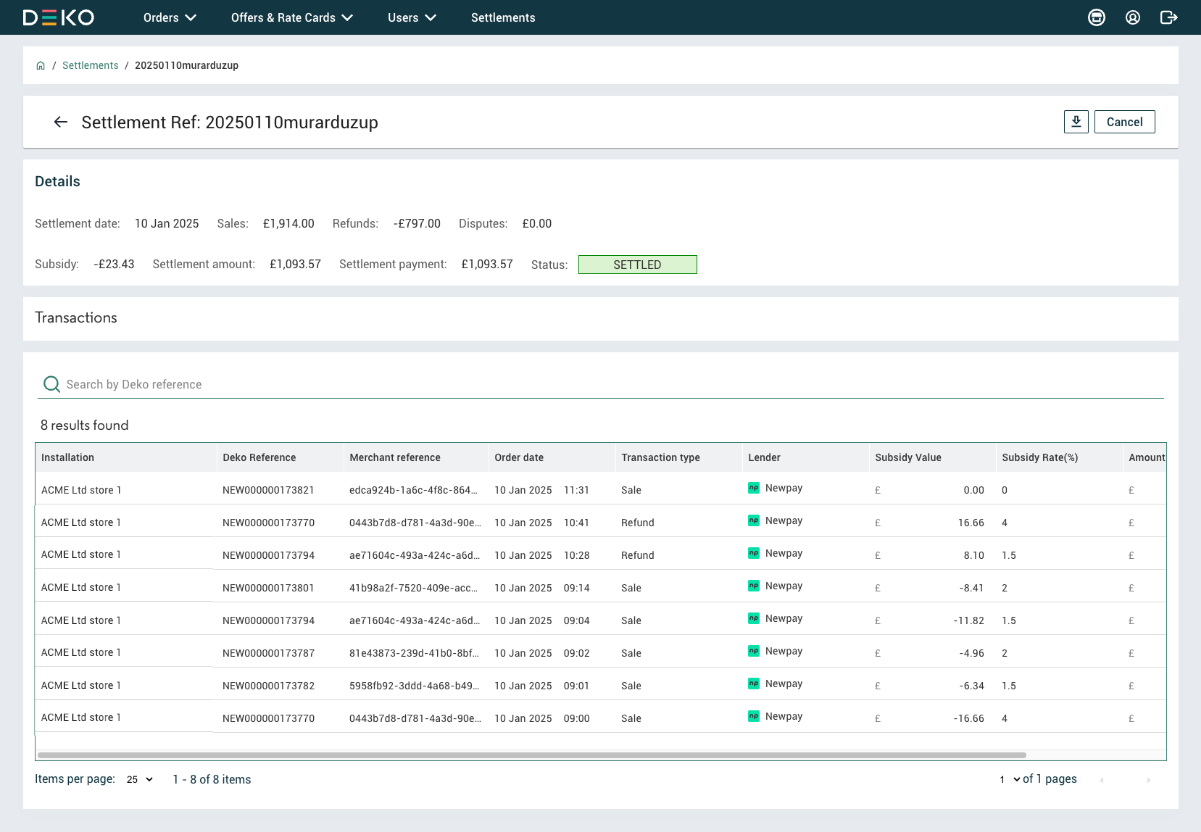
In the Settlements view, you can click "View more" on any settlement row to access a detailed overview. This includes a summary of the out-payment breakdown and an Orders view listing all transactions that comprise that specific settlement.
You can interact with this list just like any other Orders view, as it is filtered for a specific settlement and the transactions included. You can also download this list of orders to CSV for further reconciliation.
Payment and Remittance Advice
Payouts are credited to the bank account specified in your Merchant Application during onboarding. These will appear in your account within 1–2 working days, according to your agreement terms.
Your remittance advice will be emailed to your nominated finance contact.
NoteSettlements are processed daily, including weekends and bank holidays. However, payments are only made on business days. For example, remittance files generated over the weekend will result in payments landing on the next working day.
Remittance Schedule
Settlements are processed daily based on a cut-off time of 23:59. Each day’s remittance file includes all orders fulfilled from 00:00 to 23:59 on that day.
| Orders Fulfilled From | Trigger Remittance | Expected Payment Day |
|---|---|---|
| Monday 00:00 to Monday 23:59 | Tuesday | Wednesday |
| Tuesday 00:00 to Tuesday 23:59 | Wednesday | Thursday |
| Wednesday 00:00 to Wednesday 23:59 | Thursday | Friday |
| Thursday 00:00 to Thursday 23:59 | Friday | Monday |
| Friday 00:00 to Friday 23:59 | Saturday | Monday |
| Saturday 00:00 to Saturday 23:59 | Sunday | Monday |
| Sunday 00:00 to Sunday 23:59 | Monday | Tuesday |
Updated 11 months ago