
Applications
Applications provides a simple, interactive statement view through which you can browse all credit applications which have been submitted for your business, including where finance purchases were successfully completed.
This paginated view allows you to browse lists of applications which have been received according to key data from each submission, including date and time, amount, status and your own relevant transaction references.
You can choose from common date ranges to easily filter the report to list only those applications received in a given day or week, or enable a custom date range.
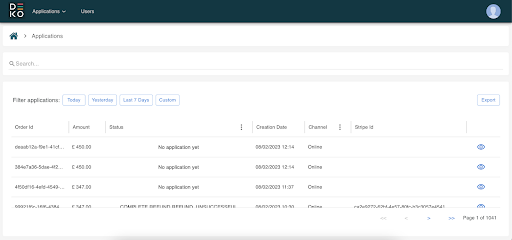
By using the ""Export data"" button at the top right of the table you can export a CSV file of the data, so that you can reconcile in your systems or share with co-workers. This export will reflect any filters or sorting you apply. Currently, you can export a maximum of 450 orders at once, if you have more than 450 records you’d like to export, we suggest using the time filters to export multiple CSV files and collating them.
To review any application in more detail - for example you want to review customer data, application history, or perform a related action such as marking an order as fulfilled - click on the eye icon to the right of the row.
To better understand the columns presented in the applications report, please review the following fields
Order ID - This is the order ID you specified and sent to Deko when your order was created. You can use this to reconcile with your own systems, for example your e-commerce platform or shopping cart.
Status - This is the current or final status of the application and may update frequently as a customer moves through the application. This can be shared with a customer if they have questions about their finance purchase.
Creation Date - This is the date and time that the credit application relating to your Merchant Order ID was created. Provided this was integrated to your shopping cart it should match your e-commerce platform data.
Amount - This is the order amount for which a credit application has been submitted and typically reflects the total price (inclusive of shipping if applicable) that a customer has to pay for their basket of goods or services.
Stripe ID - If there has been a successful payment then the stripe ID for that payment will appear here. If you need to reconcile a payment with the order, you would use this ID.
Search and Filtering
Application Search - You may simply want to retrieve an application relating to a particular order or customer, for example when a customer raises a query with you. You can use the search bar to retrieve an order using your order ID or a stripe ID.
Status - You can filter your list of applications by status for example if you want to see only those orders that ended in a successful purchase. When you click on the three-dot menu a drop-down will appear which will allow you to select, or deselect, those statuses you’d like to see.
Channel - You can also filter by channel. When you click on the three-dot menu a drop-down will appear which will allow you to select in-store or online applications.
Updated over 1 year ago